

What you need
A Telegram account, and two minutes. There is nothing to host and nothing to install. Only an Owner can connect it.Set it up
1
Add the channel
In the dashboard, go to Channels and pick Telegram.
2
Say whether you already have a bot
The steps differ, so the dialog asks first. Creating one uses
/newbot;
using one you already have uses /mybots.3
Get the token
Message @BotFather in Telegram and follow the
steps the dialog shows you. It ends with a token that looks like
123456789:AAHdqTcvCH1vGWJxfSeofSAs0K5PALDsaw.4
Paste it and press Connect bot
We check the token with Telegram before saving it. If Telegram does not
recognise it, nothing is stored and the dialog tells you.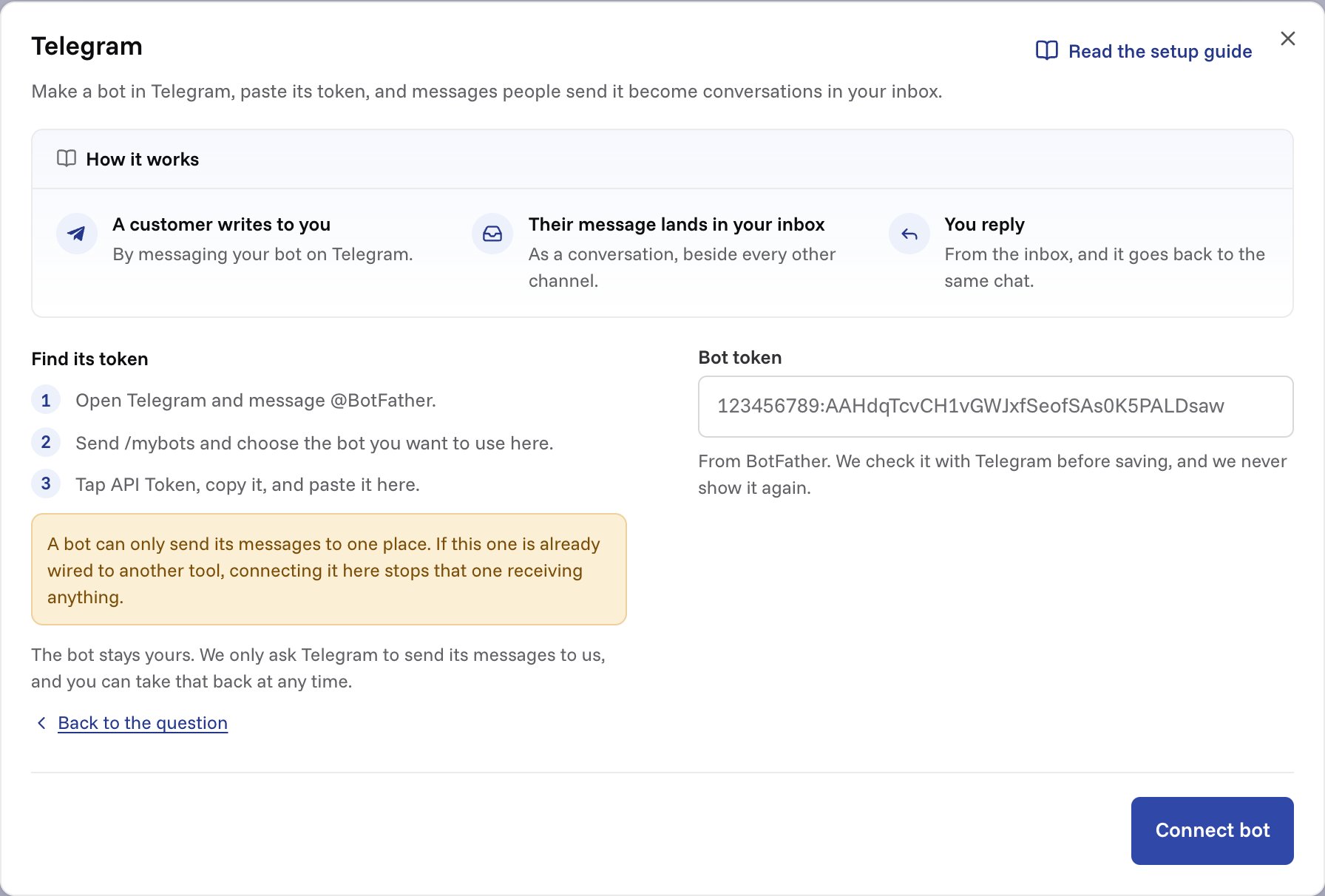
Making a bot
If you do not have one yet:- Open Telegram and message @BotFather.
- Send
/newbot. It asks for a display name, then a username ending inbot. - It replies with your token.
Using a bot you already have
- Message @BotFather.
- Send
/mybotsand choose the bot. - Tap API Token and copy it.
What we do with your token
We store it encrypted, and we never show it back to you, in the dashboard or anywhere else. There is no API that returns it. We use it only to run the bot for you: we ask Telegram to deliver its messages to us, send your replies and the Start reply back, fetch attachments and profile pictures, and check the bot still points at us. Disconnecting undoes all of it. If you ever want to be certain, revoke the token in @BotFather. That invalidates our copy along with every other.Direct messages only
One-to-one chats become conversations. Group chats are ignored. A group has one chat id and many people in it, so there is no single customer to attach the conversation to, and everyone in the room would share one record. Telegram also hides most group messages from bots by default.What arrives
Text, photos, files, voice notes, audio, video and stickers. A caption on a photo or a file is used as the message text. Photos and PDFs are stored alongside the message, up to 10MB each, the same as everywhere else in the product. Voice notes, audio, video and other files are not stored. An internal note names each one, so your team knows something was sent and can ask for a screenshot or a PDF instead. We stop at images and PDFs because almost every support attachment is a screenshot, and every file type we accept is one we have to store and serve safely. A message with no words, like a photo on its own, still becomes a conversation. It gets a short placeholder line, like “(sent a photo)”, so the thread is not blank. Locations, contact cards and polls are ignored. Edits and reactions do not arrive either: a customer who edits a message after sending it has changed their copy, not yours.Which conversation a message joins
Telegram has no threads, just one continuous stream per chat. So a new message joins the customer’s open conversation if they have one. If every conversation with them is resolved or closed, it starts a new one. That means a customer coming back a month later opens a fresh conversation rather than reviving a finished one.The Start button
Every new Telegram chat begins with the customer pressing Start, which sends the text/start to your bot.
That does not become a conversation. The bot replies with a short line inviting
them to ask their question, and waits. A ticket whose entire content is
/start is one your team would have to close on every first contact.
Only a bare /start is treated this way. A link that opens your bot with
something after it, like t.me/your_bot?start=pricing, sends /start pricing,
and that does become a conversation.
Customising the Start reply
By default the bot answers Start with: “Hi! Ask your question here and someone from (your workspace name) will get back to you.” To say something else, open Channels → Telegram and fill in Reply to Start, then press Save changes. Up to 300 characters, sent to everyone. Clear the field to go back to ours.Their profile picture
Where a customer has a Telegram profile photo, we fetch it whenever they start a new conversation and show it beside their name. A newer photo replaces the old one. People with no photo keep the initials circle. The image is stored privately and shown through a short-lived signed link, not a public URL. Erasing a customer deletes the file along with the record.Replying
Your reply goes back to the same chat. Three things are worth knowing. It is plain text. Telegram shows what you type exactly as typed, so formatting like**bold** arrives with the asterisks.
Long replies are split. Telegram caps a message at 4096 characters, so a
longer reply arrives as several messages, broken at a line where it can be.
Only the text goes. Files you attach to a reply stay on the conversation
in miniDesk. If the customer needs one, send a link.
A reply that did not arrive says so
If Telegram refuses a reply, you get an internal note on the conversation saying it was not delivered, and why: the customer blocked your bot, Telegram no longer accepts its token, or the bot is no longer connected. The note is there so nobody on your team believes the customer has an answer they never got.Automated replies
If you have AI auto-reply switched on, Telegram follows it like any other channel. Once a bot is connected, the Reply automatically on list under AI Agent → Settings gets a Telegram switch. It starts on, so you can turn it off for Telegram and leave it on for email, or the reverse.The confirmation message
When the AI is not answering a new conversation, the customer hears nothing until someone on your team replies. Switch on Confirmation message in Channels → Telegram to send them one line straight away, so they know it arrived. It goes once, when a conversation starts, and only if the AI did not reply on its own. Leave the text as it is to send ours: “Thanks for your message! We’ll get back to you as soon as we can.” Or write your own, up to 500 characters. Clear the field to go back to ours. It is off until you switch it on. Your team does not see it as a message in the thread. It is listed as Confirmation sent in the conversation’s history, and the conversation still counts as unanswered. This is separate from the Start reply. Start is answered before the customer has asked anything; the confirmation answers their first real message.On the free plan
On the free plan, the first message we send in each conversation ends with the line “Sent from miniDesk.ai”. That is the confirmation message if one went out, or the first reply if not. The Start reply never carries it. Paid plans never add it, and upgrading removes it straight away. See Branding and white labeling for everything a paid plan removes.The states
Once a bot is connected, the Channels screen shows which state it is in:
A customer pressing Start does not count. Only a real message moves the
channel to Live.
Reconnect needed is the one worth understanding. Because a bot has only one
webhook, connecting the same bot to another tool silently takes it away from
us. Telegram reports no error and neither does the other tool; your messages
just stop arriving. We ask Telegram whenever you open the Channels screen, so
the row can tell you. Paste the token again to point it back here. The channel
then waits for the next message before it says Live again.
Pausing and disconnecting
Pausing is the Accept new conversations switch. It unhooks the bot at Telegram and keeps your setup. Switching it back on hooks it up again. Nothing customers sent while it was off is picked up later. Disconnecting unhooks the bot and forgets the token, along with your Start reply and confirmation message. The bot itself is untouched and stays yours, so you can connect it here again or point it at something else. Conversations that already arrived stay in your inbox either way. They are your support history, not part of the connection.Through the API
Conversations that start on Telegram havesource: "telegram" in
the REST API. Their requesters are never
verified: Telegram vouches that an account exists, not that it belongs to one
of your customers.