

Events
miniDesk sends four event types. Every payload reuses the/v1 shapes, so what
a trigger gives you matches what the API returns: data.conversation is the
conversation as GET /v1/tickets/{id} returns it, without its messages, and
data.message is one item of that conversation’s messages.
Every payload has the same envelope:
Ids are plain UUIDs. A payload never contains internal notes, AI drafts or
reasoning, knowledge base text, attachment links, or team members’ emails.
conversation.created
Fires when a customer starts a new conversation, from any channel including the API. It is sent after triage has set category, priority and language (or failed, or found AI turned off), so you can filter on those fields. It does not fire for:- conversations the team starts, from the dashboard or through the API with
first_message_from: "team"; - spam, and mail sent by machines (auto-replies, mailing lists);
- conversations brought in by the importer.
conversation.created. It does not also fire
message.received.
message.received
Fires when a customer writes in an existing conversation. Never fires for team replies, AI replies, internal notes, or messages sent through the API. Does not fire for conversations filed as spam, or while a chat is held for the visitor’s email address.conversation.status_changed
Fires when the status changes, whoever changed it: a team member, the customer replying, our AI, an API key, or the system.conversation.assigned
Fires when the assignee changes, including when a conversation becomes unassigned.change.field is "assignee". change.from and change.to are member ids, as
GET /v1/members lists them, and null means nobody. The conversation object
does not carry the assignee: read it from change.to.
Headers
Every webhook request carries these headers:Content-Type: application/jsonUser-Agent: miniDesk-Webhooks/1miniDesk-Event-Id: the event id from the payloadminiDesk-Event-Type: the event typeminiDesk-Signature: the signature of the payload (see below)
Verifying the signature
Each webhook request is signed with your webhook’s secret, the wholewhsec_... string. Verify the signature to make sure the request came from
miniDesk.
The miniDesk-Signature header looks like this:
t is the Unix time, in seconds, when the request was sent. v1 is the
HMAC-SHA256 hex digest of the string <t>.<raw body>, keyed with your secret.
Verify against the raw body, exactly as it arrived. Parsing the JSON and
serialising it again changes the bytes, and the signature will not match. In
Express, for example, read the body with express.raw({ type: "application/json" }).
Both examples below return false and never throw: on a missing or malformed
header, a t that is not a number, a v1 that is not 64 hex characters, or a
request older than 5 minutes. They compare in constant time, on two values of
the same length.
Node.js example
Python example
Delivery and retries
We POST to your URL with a 10 second timeout. Redirects are not followed. Any 2xx response is a success. If a delivery fails, we try again after 1 minute, 5 minutes, 30 minutes, 2 hours and 6 hours. Six tries in total, over about 9 hours. After that the delivery is marked as failed. The delivery history in the dashboard keeps every try: the time, the HTTP code and how long it took. What your server answered is kept as plain text, cut to 2 KB. Response headers are not kept. When there was no HTTP answer, the history shows one of four reasons, never the raw network error:- Could not connect: the address did not answer, or the name no longer resolves.
- Timed out: no answer within 10 seconds.
- Address not allowed: the URL now points somewhere we refuse to call (see URL requirements). We check again before every try.
- Could not sign: the webhook’s stored secret could not be opened, so nothing was sent. Delete the webhook and create it again.
Pausing
When a webhook has had no successful delivery for 3 days while deliveries kept failing, we pause it and email the workspace owners once. A paused webhook gets no new deliveries. Resume it from Settings → Webhooks in the dashboard. A webhook created by an API key can also be resumed by registering the same URL again with that key (see Create a webhook). An owner can also pause a webhook by hand, for example after an unexpected “webhook added” email. That pause stays until an owner resumes it. An API key can neither resume nor delete a webhook an owner paused: registering the URL again or deleting the webhook answers409. Otherwise the key could delete the
paused webhook and register a fresh, active one.
At least once, no ordering
Delivery is at least once. You may receive the same event more than once. Deduplicate on theid field.
Events may arrive out of order. A quick second customer message can arrive
before conversation.created while triage runs. Use created_at to order
events.
Loop prevention
A webhook created by an API key never receives events caused by that same key. A workflow that creates a conversation, changes a status, or reassigns through its own key does not trigger itself. Webhooks added in the dashboard belong to no key and receive everything. Events caused by a different key do fire, anddata.actor names that key.
URL requirements
https://only. Any port is allowed.- No user name or password in the URL.
- Public addresses only. We refuse private and internal addresses,
minidesk.aiand its subdomains, and our own servers’ addresses. We check when you save the webhook and again before every try, on the address we actually connect to. - Up to 10 webhooks per workspace.
hooks.example.com), never the full URL.
Managing webhooks
From the dashboard
Go to Settings → Webhooks (owners only). Owners see every webhook in the workspace, whoever added it. Add a webhook by pasting a URL and choosing which events to receive. The secret is shown once, when the webhook is created. After that it is masked. Lost secret: delete the webhook and create it again.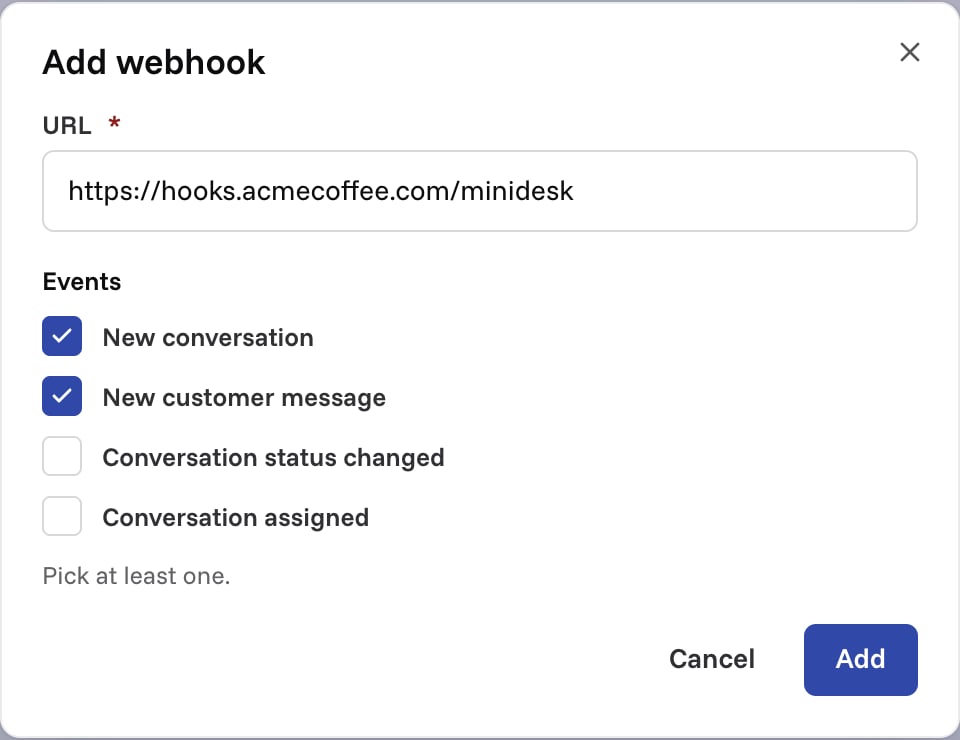
From the API
An API key can register webhooks with the/v1/webhooks endpoints, and list,
read and delete only the ones it registered. A webhook added in the dashboard
or by another key is not listed, and its id answers 404.
Workspace owners get an email every time an API key adds a webhook, naming the
key and the receiving host. Registering the same URL again does not email them
again.
Revoking an API key deletes the webhooks it created.
Create a webhook
201 Created with the webhook and its secret:
200 OK: same id and delivery history, the
events you sent replace the old ones, a new secret, and the webhook is active
again if it was paused for failing. If an owner paused it by hand, the answer
is 409 Conflict and the webhook stays paused:
List webhooks
Get a webhook
status: "paused" means nothing is being sent. Returns 404 if the webhook does not
belong to this API key.
Delete a webhook
409 Conflict and the
webhook stays. Only an owner can resume or delete it, in Settings → Webhooks:
Error responses
A refused URL returns400 Bad Request, with one message whatever the reason:
https://, carries a user name or
password, points at a private address or at one of ours, or does not resolve.
409 Conflict means the workspace already has 10 webhooks, or an owner paused
the webhook you are registering again or deleting. 404 Not Found means the
webhook does not exist or belongs to another key.
Test events
Send a test event from Settings → Webhooks in the dashboard. The test event has typeping and carries no conversation: